SolFITS: Plate Solve a Night in One Go
Announcing SolFITS, a new macOS application that plate solves whole folders of FITS images.
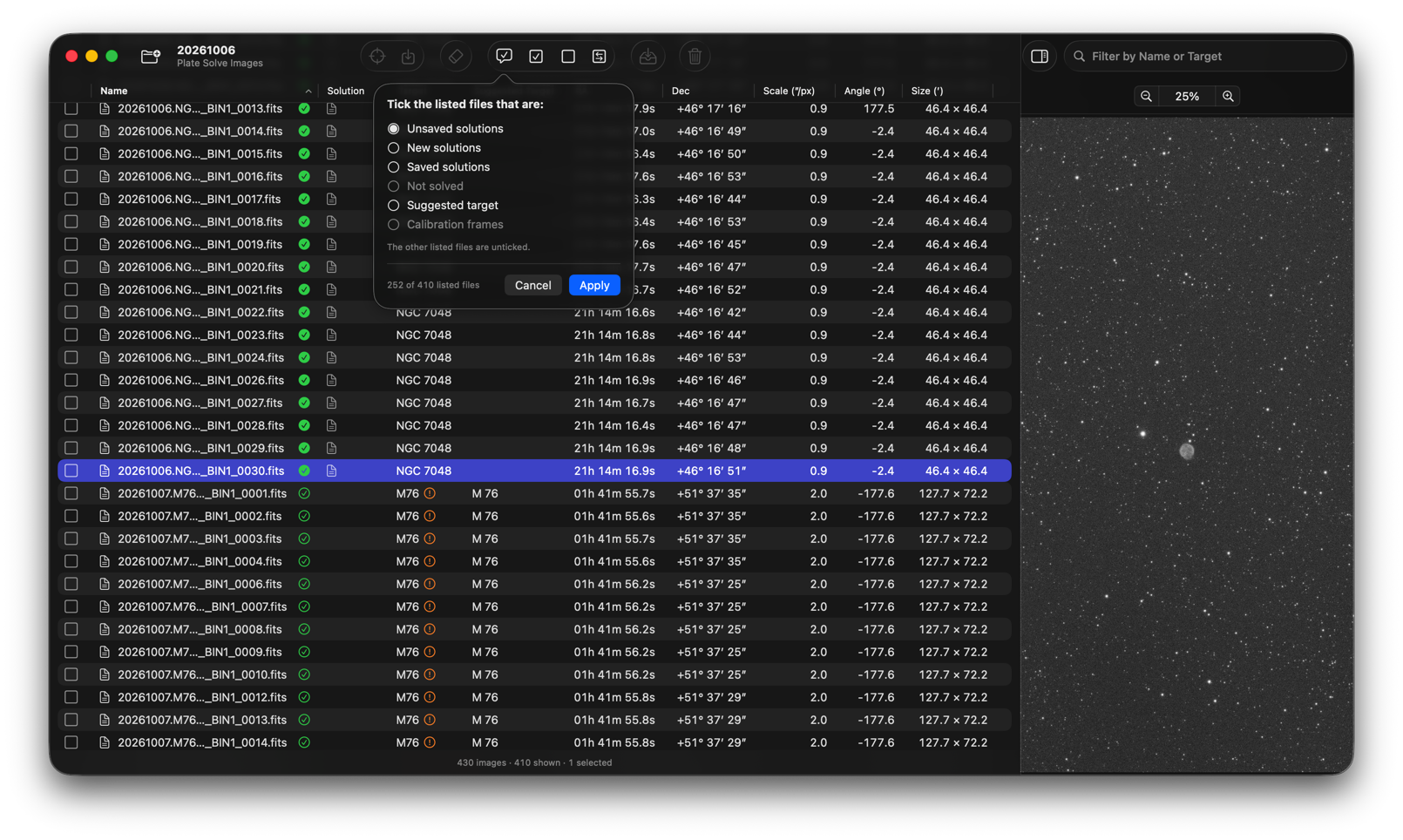
Your capture program knows roughly where the telescope was pointing, but not exactly where the camera was looking. Other software, such as programs that mark the objects in an image or build a mosaic by coordinates, needs a plate solved image. SolFITS works out the position, scale, rotation and field size of every image in a folder, and optionally its subfolders, on your Mac. Then you decide which solutions to save, and where.
SolFITS, FITSit and Observatory cover important steps from the telescope to a finished picture, but each works entirely on its own. Tidy a folder with FITSit, solve it with SolFITS, then import it into Observatory, which recognizes the solutions saved in the FITS header or as an extended attribute and uses them to show the objects in each image.
SolFITS is available now on the Mac App Store, with a 14-day free trial.
Plate Solve Images
Choose a folder, or drop one on the window, and the table fills in as the results arrive.
- The star catalog is built into the app, so solving needs no internet connection
- Images help each other: one solved image gives a starting point for the others of the same sky
- Images with no position in their headers are solved from an earlier solution or from the target named in
OBJECTor in the file name - Calibration frames are recognized and skipped, and solutions an image already has are used
- As a last resort, images can be sent to astrometry.net with your own API key; only the positions of the stars are sent, never the image
Check the Results
Every file is a row with its target, position, pixel scale, rotation and field size. Sort by any column, search by name, or show only the files with unsaved solutions, new solutions or a suggested target. Select a file to see its picture with an automatic screen stretch, and zoom from 1% to 1000% to compare the same area in different images. Files you don’t need can be moved to another folder or to the Trash.
Keep the Answer with Your Files
Tick the images whose solutions you want to keep and choose where they go: the FITS header (only the WCS keywords are written), a .wcs file next to the image, or an extended attribute that leaves the file untouched. A solution that turns out to be wrong can be deleted again.
Name Your Targets
The OBJECT of a header is often missing, mistyped or written in some other way. Because SolFITS knows where each solved image points, it can suggest the name its catalogs use, and writes it to the OBJECT card when you confirm. Nothing else in the header changes.
Details
- Supports
.fits,.fitand.ftsfiles of any bit depth, including raw color (Bayer) frames - Solving only reads your files; only the files you have ticked are changed, and only when you confirm
- Includes a built-in Help book
Requirements: macOS 26.5+, Apple silicon and Intel. Price: USD 9.99, with a 14-day free trial.