SolFITS
Find out where in the sky each of your images was taken, and keep the answer with the files.
SolFITS is a Mac app that plate solves whole folders of FITS images, and optionally their subfolders. Choose a folder and it works out the position, scale, rotation and field size of every image, on your Mac. Then you decide which solutions to save, and where, and SolFITS can name the targets of your images from what they really show.
Where was the camera looking, exactly?
Most programs write the position of the mount or of the target into the header, often with the focal length and pixel size. What they don’t write is a solution: the exact position of the image’s center, the size of a pixel on the sky, the rotation of the image and the size of its field. That takes plate solving, and a lot of software needs the result.
Other software wants the solution.
Marking the objects in an image, building a mosaic by coordinates and measuring the field all need a plate solved image.
A night leaves you hundreds of frames.
Solving them one at a time, each with a starting position and a pixel scale typed in, isn’t practical.
Some images have no position at all.
Not every program or camera writes one, and a solver then has nothing to start from.
Targets are sometimes wrong or forgotten.
The OBJECT of a header is typed by hand or left over from the previous target, and it is easily mistyped or missing.
SolFITS solves the whole folder at once, finds its own starting points where the header has none, and names the targets from what the solved images show.
Plate solving for every image in a folder
Plate solving works out where in the sky an image was taken by recognizing the pattern of stars in it and matching that pattern to a star catalog. The result is a solution, also called a WCS (World Coordinate System).
SolFITS does this for every FITS file in a folder, and optionally its subfolders. It works with .fits, .fit and .fts files of any bit depth, including raw color (Bayer) frames from one-shot-color cameras.
What a solution tells you
- The exact position of the image’s center
- The size of a pixel on the sky
- The rotation of the image
- The size of its field
One window, one folder, every image solved
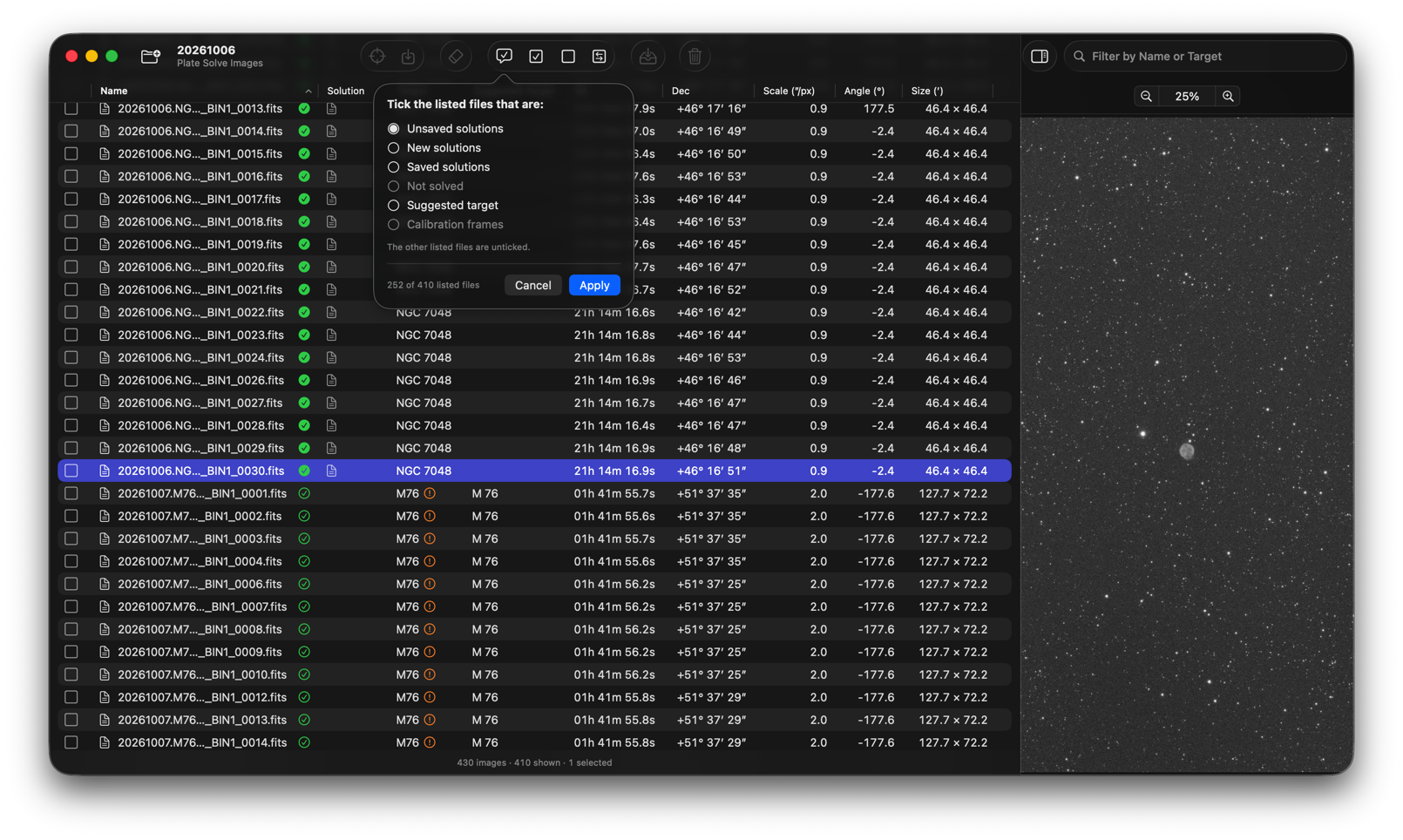
Click Choose Folder, or drop a folder on the window, and SolFITS lists every FITS file in it at once. The images that need a solution are then solved, and the table fills in as the results arrive. You can look the results over while the solving goes on.
Everything on your Mac
The star catalog is built into the app, so solving needs no internet connection.
Images help each other
One solved image gives a starting point for the others of the same sky.
Calibration frames are skipped
Bias, dark and flat frames show no stars, so SolFITS recognizes them and leaves them alone.
Solutions you already have are used
An image that already has a solution, in its header, a .wcs file or an extended attribute, needs no solving.
Even without coordinates
When the header has no position, SolFITS starts from an image of the same sky that it has solved before, or from the target named in OBJECT or in the file name. Name the target, and images with no coordinates at all are solved on your Mac.
As a last resort, astrometry.net
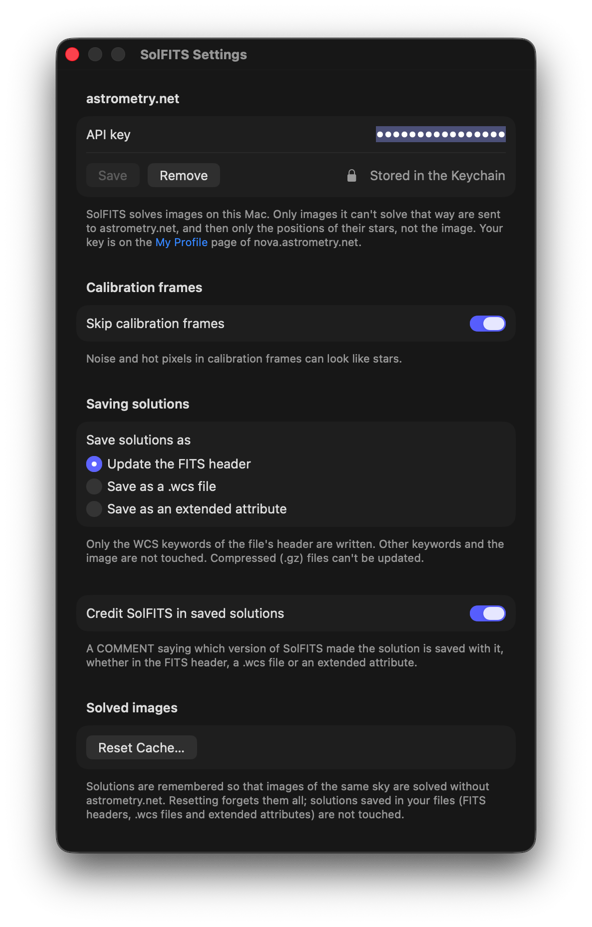
Images that nothing else can solve can be sent to astrometry.net, if you enter your own API key in the settings (a free account will do). Only the positions of the stars are sent, never the image.
An image that can’t be solved says why: no suitable stars, no match with the catalog, or nothing to start from.
See at a glance which images are solved, and what they show
A row for every file
Each file shows its target, position, pixel scale, rotation and field size, and icons show where a solution is already saved and how each image stands. Sort by any column, search by name, or show only the files with unsaved solutions, new solutions or a suggested target. Tick by Condition ticks the files in a state you choose.
See the picture
Select a file and open the side panel to see its picture. It has an automatic screen stretch, so faint detail shows from the first look, and zoom from 1% to 1000% that stays put as you move from file to file, which makes it easy to compare the same area in different images. It is a quick way to see why an image didn’t solve: clouds, trailing, a dark frame.
Tidy up as you go
Tick the files you don’t need and move them to another folder or to the Trash, without leaving the window.
Keep the answer with your files
Tick the images whose solutions you want to keep, click Save Solutions and confirm. Choose where they go:
The FITS header
The default. Only the WCS keywords are written, and any program that reads FITS headers can use the solution.
A .wcs file
Next to the image, for software that works with .wcs files. The FITS file isn’t touched.
An extended attribute
Stored with the file by macOS. Not even the header is touched.
Changed your mind, or found a solution that turns out to be wrong? Delete Solutions removes it again from the place you choose.
Let the image say what it shows
The OBJECT of a header is often missing, mistyped or written in some other way (m31, ngc2403). Because SolFITS knows where each solved image points, it can suggest the name its catalogs use.
Tick the images you want to change, click Name Targets and confirm, and the names are written to the OBJECT cards. Nothing else in the header changes.
A good OBJECT helps SolFITS itself
When a header has no coordinates, SolFITS starts looking at the place the name gives.
A few settings, all in one window
Your astrometry.net API key, where solutions are saved, whether calibration frames are skipped, and the memory of the images SolFITS has solved, which you can reset whenever you like.
Works with FITSit and Observatory
SolFITS works entirely on its own, but it is one of three Mac apps from Code Obsession, covering important steps from the telescope to a finished picture.
| App | Use it to |
|---|---|
| FITSit | Look after your FITS files: read and edit their headers, name them sensibly, weed out the bad frames and flip through the rest. |
| SolFITS | Find out where each image is in the sky, and save that with the file. |
| Observatory | Manage your astrophotography library by session, target and equipment, and see what is in every picture. |
A typical path: tidy a folder with FITSit, so no time is spent solving bad frames and the names are clean. Solve it with SolFITS and save the solutions. Then import the folder into Observatory, which recognizes the solutions saved in the FITS header or as an extended attribute, and uses them to show the objects in each image and to tag them.
Built to be safe with your data
Read-only solving
Solving only reads your files. Pixels are never changed.
Only what you tick
Only the files you have ticked are ever changed, and only when you click Save Solutions, Delete Solutions or Name Targets and confirm.
Recoverable trash
Trashed files go to the Trash, where you can still get them back.
Private by default
Only the positions of the stars are sent to astrometry.net, and only if you set a key.
Choose a folder, and SolFITS does the rest
Tick what you want to keep, and save.
USD 9.99 · one-time purchase, with a 14-day free trial
Requirements: SolFITS runs natively on Apple silicon and Intel Macs, on macOS 26.5 or later.
SolFITS includes a built-in Help book describing the window, the settings and every shortcut.
Questions or feedback? We’d love to hear from you: support@codeobsession.com
Also from Code Obsession: FITSit, for tidying up FITS files before they are solved, and Observatory, your astrophotography library.